---
url: /guides/directory-structure.md
---
# Directory Structure {#directory-structure}
This lists the conventional (or recommended) directory structure in WinJS projects. Please organize your code according to this directory structure during project development.
:::tip Tip
One of the design principles of the WinJS framework is [Convention over Configuration](https://en.wikipedia.org/wiki/Convention_over_configuration). In most cases, you can write code directly according to conventions without any configuration.
:::
```bash
.
├── config
│ └── config.ts
├── dist
├── mock
│ └── app.ts|tsx
├── public
├── src
│ ├── .win
│ ├── .win-production
│ ├── layouts
│ │ ├── BasicLayout.vue
│ │ ├── index.less
│ ├── models
│ │ ├── global.ts
│ │ └── index.ts
│ ├── pages
│ │ ├── index.less
│ │ └── index.vue
│ ├── utils // Recommended directory
│ │ └── index.ts
│ ├── services // Recommended directory
│ │ └── api.ts
│ ├── app.(ts|tsx)
│ ├── constant.(ts|js)
│ ├── global.ts
│ ├── global.(css|less|sass|scss)
│ ├── overrides.(css|less|sass|scss)
│ └── favicon.(ico|gif|png|jpg|jpeg|svg|avif|webp)
├── node_modules
│ └── .cache
│ ├── bundler-webpack
│ ├── mfsu
│ └── mfsu-deps
├── .env
├── .editorconfig // Editor coding style configuration
├── .eslintignore // ESLint validation ignore file
├── .eslintrc.js // ESLint validation configuration
├── .gitignore // Git ignore file
├── .npmrc // NPM source address configuration
├── .markdownlint.json // Markdown lint tool
├── .markdownlintignore // Markdown lint ignore file
├── .prettierignore // Prettier code formatting ignore file
├── .prettierrc.js // Prettier code formatting configuration
├── .stylelintrc.js // Stylelint CSS code standards configuration
├── .stylelintignore // Stylelint CSS ignore file
├── commitlint.config.js // Git commit standards configuration
├── f2elint.config.js // F2ELint configuration file
├── plugin.ts
├── .winrc.ts // Choose one between this and config/config file
├── package.json
├── tsconfig.json
└── typings.d.ts
```
## Root Directory
### package.json
WinJS does not automatically register plugins and presets starting with `@winner-fed/preset-`, `@winner-fed/plugin-`, `win-preset-`, and `win-plugin-` in `package.json`. If you need to customize additional plugins and presets, you need to manually configure them in [`plugins`](../config/config#plugins).
### .env
Environment variables, for example:
```text
PORT=8888
COMPRESS=none
```
### .winrc.ts
> Has the same functionality as the `config/config.ts` file, choose one. The `.winrc.ts` file has higher priority.
Configuration file containing all [non-runtime configurations](../config/config) for WinJS (runtime configurations are generally defined in [`app.ts`](#apptstsx)).
If you need to load different configurations in different environments, this is implemented in WinJS based on [`WIN_ENV`](./env-variables#win-env) or [`WIN_APP_ENV`](./env-variables#win-app-env). An example of starting in different environments:
```json
// package.json
{
"scripts": {
"dev": "win dev",
"dev:pre": "cross-env WIN_ENV=pre win dev"
}
}
```
### config/config.ts
> Has the same functionality as the `.winrc.ts` file, choose one. The `.winrc.ts` file has higher priority.
Same as [`.winrc.ts`](#winrcts), the difference is that you can manage all configurations centrally in a separate `config` folder, keeping the project root directory clean.
### dist Directory
The default output folder for build artifacts after executing `win build`. You can modify the build output folder through the [`outputPath`](../config/config#outputpath) configuration.
### mock Directory
Stores mock files. All `.ts` / `.js` files in this directory will be loaded by the mock service to provide simulated data. For usage details, see [Mock](mock).
### node\_modules/.cache
Cache file directory generated by WinJS during builds, storing `babel` cache, `MFSU` cache, etc.
::: tip Tip
If `MFSU` build fails, you can delete the `.cache` directory, which will be regenerated on the next build. You can also directly execute `win cache clean` to clear it.
:::
### public Directory
The `public/` directory serves as the framework's default static resource directory. In addition to storing the page template `index.html` file, resources that are not compiled by build tools can be placed in this directory.
For example, the `favicon.ico` file - we don't want this filename to be compiled (by default, static resource filenames generate unique hashes after compilation, but `favicon.ico` should maintain its original filename). When using it, reference it directly in the HTML template:
```html
```
Additionally, resources not imported by source code are also stored in the `public` directory, such as UMD links after setting externals. When not using CDN, they can be directly placed in the `public` directory.
Resources in the `public` directory can be accessed directly through the root path `/` during development, and will be completely copied to the root directory of the target directory when packaged.
::: warning Note
* Please avoid referencing files in the public directory through import in source code. The correct way is to reference them through URL.
* When referencing resources in the public directory through URL, please use absolute paths instead of relative paths.
* During production build, files in the public directory will be copied to the build output directory (default is dist). Please note to avoid name conflicts with build artifacts. In the builder "Rsbuild", when files in public have the same name as build artifacts, build artifacts have higher priority and will overwrite files with the same name in public. This feature can be disabled by setting server.publicDir.copyOnBuild to false.
:::
### src Directory
#### .win Directory
::: warning Warning
**Do not commit `.win` temporary files to git repository, they are ignored by default in `.gitignore`.**
:::
Temporary file directory during dev, such as entry files, routes, etc., will be temporarily generated here.
#### .win-production Directory
::: warning Warning
**Do not commit `.win-production` temporary files to git repository, they are ignored by default in `.gitignore`.**
:::
Temporary file directory during build, which is the engine of the entire WinJS project. Temporary directories and files are a very important part of WinJS. The framework or plugins will generate temporary files based on your code, such as entry files, routes, etc. Due to their temporary nature, they are deleted and regenerated every time WinJS starts.
#### app.\[ts|tsx]
[Runtime configuration](../config/runtime-config) file, where you can extend runtime capabilities, such as modifying routes, modifying render methods, etc.
The logic brought by runtime configuration will run in the browser, so when there are remote configurations and dynamic content that we are not sure about during local development and cannot hardcode, we need to dynamically obtain them when the browser actually runs the project.
#### constant.(js|ts)
Define constants (PascalCase, words connected with underscores). When writing business programs, there will be some required constant values, such as order status, 1, 2, 3... Generally, these values are fixed and unchanging. If these values are directly hardcoded into the code, they can be understood as "magic values". The existence of magic values is syntactically reasonable, but from a business perspective, it makes it impossible to understand the meaning of 0, 1, 2, 3. For these magic values, we often need to infer the logic through context. If it's very complex business or code from 10 years ago, it would be even worse - there might not even be documentation comments. For readability, we should try to avoid magic values.
Here's an example:
```vue
Service Duration
1 Month
¥{{combinePrice.farePerMonth}}
3 Months
¥{{combinePrice.farePerQuarter}}
6 Months
¥{{combinePrice.farePerHalfyear}}
```
What the heck is `999999999`...
```javascript
// constant.js
...
// Agreement between backend and frontend
// Special 999999999 price, not displayed in UI
const SPECIAL_PRICE = 999999999;
export {
...
SPECIAL_PRICE
};
```
#### layouts/index.vue
Global layout that takes effect on all routes by default. For example, with the following route relationships:
```js
[
{ path: '/', component: '@/pages/index' },
{ path: '/users', component: '@/pages/users' },
]
```
The output would be:
```jsx
indexusers
```
When you need to disable layout, you can use `layout: false`. When you need more layers of layout, you can consider using [`wrappers`](./routes#wrappers), available only in configuration-based routing:
```ts
routes: [
{ path: '/', component: './index', layout: false },
{
path: '/users',
component: './users',
wrappers: ['@/wrappers/auth']
}
]
```
#### pages Directory
Convention-based routing generates route tables based on the file hierarchy structure of the `pages/*` folder by default.
In configuration-based routing, if `component` is written as a relative path, it will start searching for files from this folder:
```ts
routes: [
// `./index` === `@/pages/index`
{ path: '/', component: './index' }
]
```
##### Basic Routes
Assuming the `pages` directory structure is as follows:
```text
+ pages/
+ users/
- index.tsx
- index.tsx
```
Then, the following route configuration will be automatically generated:
```ts
[
{ path: '/', component: '@/pages/index.tsx' },
{ path: '/users/', component: '@/pages/users/index.tsx' },
]
```
##### Dynamic Routes
Directories or files with `$` prefix are conventionally dynamic routes. If no parameter name is specified after `$`, it represents `*` wildcard. For example, with the following directory structure:
```text
+ pages/
+ foo/
- $slug.tsx
+ $bar/
- $.tsx
- index.tsx
```
The following route configuration will be generated:
```ts
[
{ path: '/', component: '@/pages/index.tsx' },
{ path: '/foo/:slug', component: '@/pages/foo/$slug.tsx' },
{ path: '/:bar/*', component: '@/pages/$bar/$.tsx' },
]
```
##### pages/404.tsx
When using convention-based routing, this file will be automatically registered as the global 404 fallback page. If you use configuration-based routing, you need to manually configure the fallback route as the last one in the route table:
```ts
routes: [
// other routes ...
{ path: '/*', component: '@/pages/404.tsx' }
]
```
#### services Directory
Encapsulation of network request libraries. Wrapper for HTTP protocol interfaces.
* autoMatchBaseUrl.js - If the project needs to interface with multiple server endpoints, you need to define multiple interface request paths in config.local.js. This file is for automatic adaptation based on different prefixes. You can refer to the following example: *autoMatchBaseUrl used in conjunction with config.local.js*
* request.js - Wrapper for axios, main function is URL, URL, formData)
* RESTFULURL.js - Mapping table for all server interfaces. It's not recommended to add specific interface paths to the corresponding value. You can refer to the following example: *RESTFULURL.js* example, such as the standard URL `http://xx.com/v1/func_get_user_info`
* HTTP protocol path
* path: v1/
* Interface name: `[func_get_user_info](http://xx.com/v1/func_get_user_info)`
* Because sometimes the interface paths in development and production environments may change, when configuring API\_HOME, it's better to use HTTP protocol path + path.
```javascript
// autoMatchBaseUrl used in conjunction with config.local.js
// config.local.js
window.LOCAL_CONFIG = {
API_HOME: 'http://api.github.com/',
CLINET_API_HOME: 'http://client.github.com/',
MALL_API_HOME: 'http://mall.github.com/'
};
// constant.js
const QUOTE_PREFIX = 'v1/';
const CLIENT_PREFIX = 'client/';
const MALL_PREFIX = 'shop/';
export { QUOTE_PREFIX, CLIENT_PREFIX, MALL_PREFIX };
// autoMatchBaseUrl.js
export default function autoMatchBaseUrl(prefix) {
const options = {};
switch (prefix) {
case QUOTE_PREFIX:
options.headers = { 'Content-Type': 'application/x-www-form-urlencoded' };
options.baseUrl = window.LOCAL_CONFIG.QUOTE_HOME + QUOTE_PREFIX;
break;
case CLIENT_PREFIX:
options.data = {
user_token: store.getters.clientToken
};
options.headers = { 'Content-Type': 'application/x-www-form-urlencoded' };
options.baseUrl = window.LOCAL_CONFIG.IFS_API_HOME + CLIENT_PREFIX;
break;
case MALL_PREFIX:
options.data = {
fansToken: encrypt.encrypt(store.getters.userInfo.fundAccount)
};
options.headers = { 'Content-Type': 'application/x-www-form-urlencoded' };
options.baseUrl = window.LOCAL_CONFIG.MALL_API_HOME + MALL_PREFIX;
break;
default:
// Default
options.data = {
user_token: store.getters.apiToken
};
options.headers = {
Accept: 'application/json',
'Content-Type': 'application/x-www-form-urlencoded; charset=utf-8'
};
options.baseUrl = window.LOCAL_CONFIG.API_HOME + HOME_PREFIX;
}
return options;
}
```
```javascript
// RESTFULURL.js
export default {
...
getUserInfo: 'func_get_user_info'
...
}
```
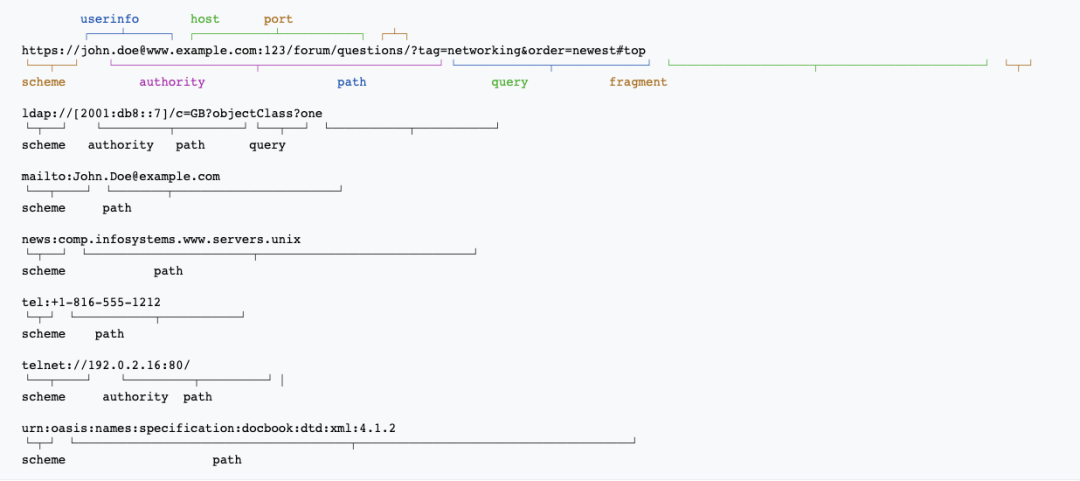
> HTTP, HTTPS or custom protocol components can be referenced as follows:
#### global.(j|t)sx?
Global script file.
Unlike other frontend frameworks, WinJS does not have an explicit main program entry (such as `src/index.ts`), so when you have logic that needs to run globally and before the application, consider writing it in `global.ts`.
When you need to add global Context or modify application runtime, please use [`app.tsx`](#apptstsx).
#### global.(css|less|sass|scss)
Global style file.
When you have styles that need to be used globally, consider adding them to this file.
::: tip Tip
Note that this file has lower priority than third-party component library styles, so when you need to override third-party library styles, please use [`overrides.css`](#overridescsslesssassscss).
:::
#### overrides.(css|less|sass|scss)
High-priority global style file.
This file is generally dedicated to overriding third-party library styles, where all CSS selectors will be prefixed with `body` to increase priority.
### plugin.ts
Project-level WinJS plugin.
When you have WinJS customization needs, you often need to use [Plugin API](../api/plugin-api) (such as [modifying build HTML](../api/plugin-api#modifyhtml)). At this time, you can create this file for customization:
```ts
import type { IApi } from 'win';
export default (api: IApi) => {
api.onDevCompileDone((opts) => {
opts;
// console.log('> onDevCompileDone', opts.isFirstCompile);
});
api.modifyHTML(($) => {
$;
});
api.chainWebpack((memo) => {
memo;
});
};
```
### favicon
Site `favicon` icon file.
When the `src/favicon.(ico|gif|png|jpg|jpeg|svg|avif|webp)` file exists, the site `favicon` will be automatically added to the build output:
```html
```
If using external resources, you can manually configure site icons using [favicons](../config/config#favicons). Configuration values take precedence over conventions.
### .editorconfig
This file is a solution for unifying code formatting that helps developers define and maintain consistent code styles across different editors and IDEs. Common IDEs like WebStorm can be configured. You can refer to [editorconfig](https://editorconfig.org/)
### prettier.config.js\[.prettierrc.js]
Prettier configuration file for code formatting, such as .vue, .js, .ts, .css, .less files
```javascript
module.exports = {
...require('@winner-fed/prettier-config-win'),
plugins: ['prettier-plugin-organize-imports', 'prettier-plugin-packagejson']
}
```
Check command:
```bash
prettier --write \"src/**/*.{js,jsx,json,ts,tsx,css,less,scss,vue,html,md}\"
```
### stylelint.config.js
Style coding standard configuration file for detecting .less, .css and other style files
```javascript
module.exports = {
extends: '@winner-fed/stylelint-config-win'
};
```
### .eslintrc.js
JavaScript coding standards for detecting .vue, .js, .ts files
```javascript
module.exports = {
extends: ['@winner-fed/win', '@winner-fed/win/vue']
};
```
### f2elint.config.js
[F2ELint](./f2elint) is a supporting Lint tool for "Frontend Specification". It can be used to one-click integrate specifications into projects, one-click scan and fix specification issues, ensuring project coding standards and code quality.
```javascript
module.exports = {
enableStylelint: true,
enableMarkdownlint: true,
enablePrettier: true
};
```
### .markdownlint.json
Supporting shareable markdownlint configuration. You can refer to [@winner-fed/markdownlint-config-win](https://www.npmjs.com/package/@winner-fed/markdownlint-config-win)
```json
{
"extends": "@winner-fed/markdownlint-config-win"
}
```
### commitlint.config.js
Commitlint configuration file for validating git commit messages. Inherits [@winner-fed/commitlint-config-win](https://www.npmjs.com/package/@winner-fed/commitlint-config-win)
```javascript
module.exports = {
extends: ['@winner-fed/commitlint-config-win']
};
```